Apr 7, 2025
Enhancing Pinterest's User Experience and Monetization
This case study addresses Pinterest's struggle to balance monetization through ads with user satisfaction by conducting user research, identifying pain points around excessive ads, algorithmic repetition, search functionality, and ultimately proposing advanced AI content filters as the highest-priority feature.
What is Pinterest?
Product Description and Goal:
Pinterest defines itself as a "visual discovery engine for finding ideas such as recipes, home and style inspiration, and more." Users can explore various topics, trends, and creators through search and personalized recommendations. They can discover visual inspiration by browsing images, videos, or products organized as "pins"—digital bookmarks that let users save and revisit content they find appealing. Pinterest also offers tools for refining searches, such as using the camera to find visually similar ideas or filtering results by specific categories like skin tone range or hair pattern. In addition to saving and sharing, users can shop directly from Pins, making it a platform for inspiration and "practical purchasing."
Pinterest's Mission:
Pinterest does not have a separate mission statement page aside from its "About the Company" article. Pinterest initially started as a digital pinboard and scrapbooking platform. The concept of collecting was built into its earliest iterations, which allowed users to organize and share the things they love. According to Ben Silbermann, a cofounder of Pinterest, Pinterest "at its most basic level, it's just about you...It's really about your personal interests."
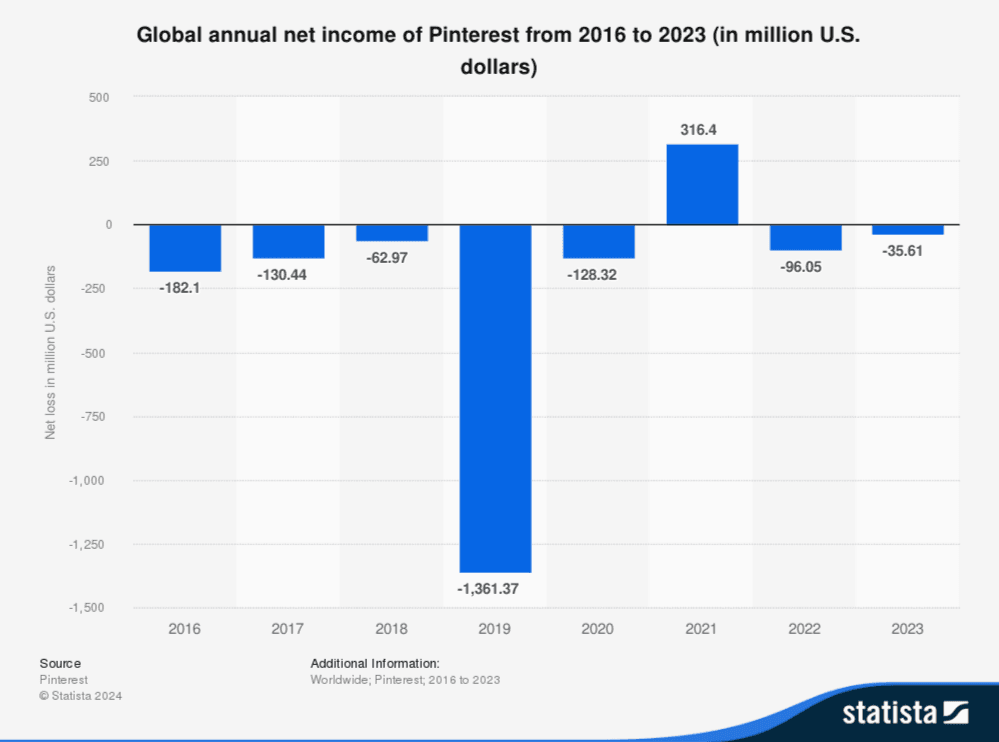
However, despite having an interesting product, Pinterest struggled to find its footing in monetization during its early stages. Previously, the company ignored revenue generation for the product, meaning monetization features rolled out slowly, and it was too late to catch up to other social media monetization strategies. Only now is Pinterest focusing on providing features for advertisers, including AI and automation campaign features, personalized promotions, and deal ad modules. As you can see in the chart below, Pinterest is still struggling to break even on net income.
Pinterest's Main Issue
What Problems does Pinterest face? (Secondary Research):
As mentioned previously, Pinterest's biggest problem is the business's monetization. How do users view their business model, and does it benefit them and the company? According to a Pinterest Newsroom article, "55% of Pinners see Pinterest as a place to shop." In their footnotes, they retrieved this statistic from an in-product survey in the US, UK, Canada, Australia, France, Germany, Japan, Brazil, and Mexico. The study was conducted in Q1 2023 with an average 30-day roll-up and 3443 responses. Despite their claims, 55% of Pinners seeing Pinterest primarily as an e-commerce platform was... a suspicious statistic. In my 6 years of using Pinterest and observing Internet users' opinions, I see that the online fan base has a different perspective.
But how do I validate these views? Without having access to internal data or insight into how the study was conducted, there aren't many resources I can turn to where users are open about their opinions without being incentivized. I tried looking for a Pinterest Discord or community section, but there isn't one. Additionally, I scoured Facebook to see if they have a Pinterest group, and they do! Unfortunately, most of the posts are ads for independent bloggers. There were only a few posts about users' opinions regarding Pinterest's features. With little luck getting secondary research, I tried Pinterest's subreddit and discovered a mine of user criticism. I spent a few days saving threads and compiling them into a document, organizing the criticisms into an ordered list of problems Reddit users have with Pinterest.
Biggest Complaints | Description | Threads |
|---|---|---|
Ad Overload | The biggest complaint I've seen from r/pinterest users about Pinterest is the ads, which are a problem since ads are Pinterest's primary revenue model. | |
Search Functionality | The second biggest complaint is the poor quality of pins suggested based on keywords input into the search functionality. Users are frustrated that Pinterest advertises itself as a | |
Algorithm Frustrations | The third biggest complaint is the declining accuracy of the algorithm's recommendations. With the feedback related to the search functionality, session durations and average session duration might decrease because users lack the incentive to stay on the platform. What is the point of using Pinterest for inspiration through personalized recommendations when users' homepages don't reflect their interests? | |
Other Issues | Beyond Pinterest's value proposition and monetization problems, many UI and overall usability issues persist, including violations and content markdown issues. |
Clarifying Questions for the Users:
Pinterest faces several challenges, including issues with its value proposition, feature functionality, and the impact of its chosen business model on its user base. Unfortunately, I can only use Reddit as a secondary source to evaluate the user base's perception of Pinterest. However, based on these complaints, I can start thinking about the clarifying questions I should ask when I interview actual Pinterest users.
Table
User Segments
Primary Research:
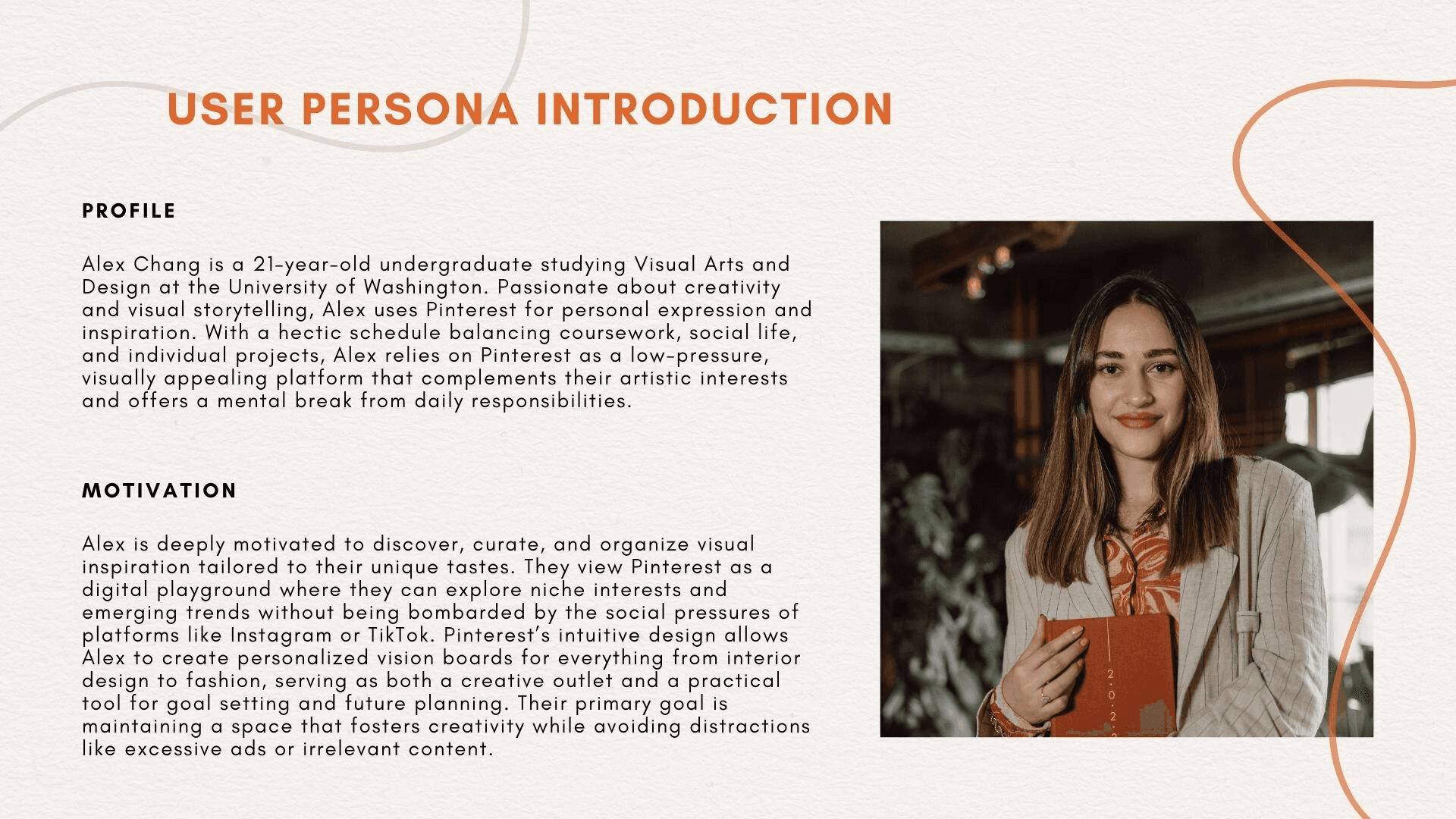
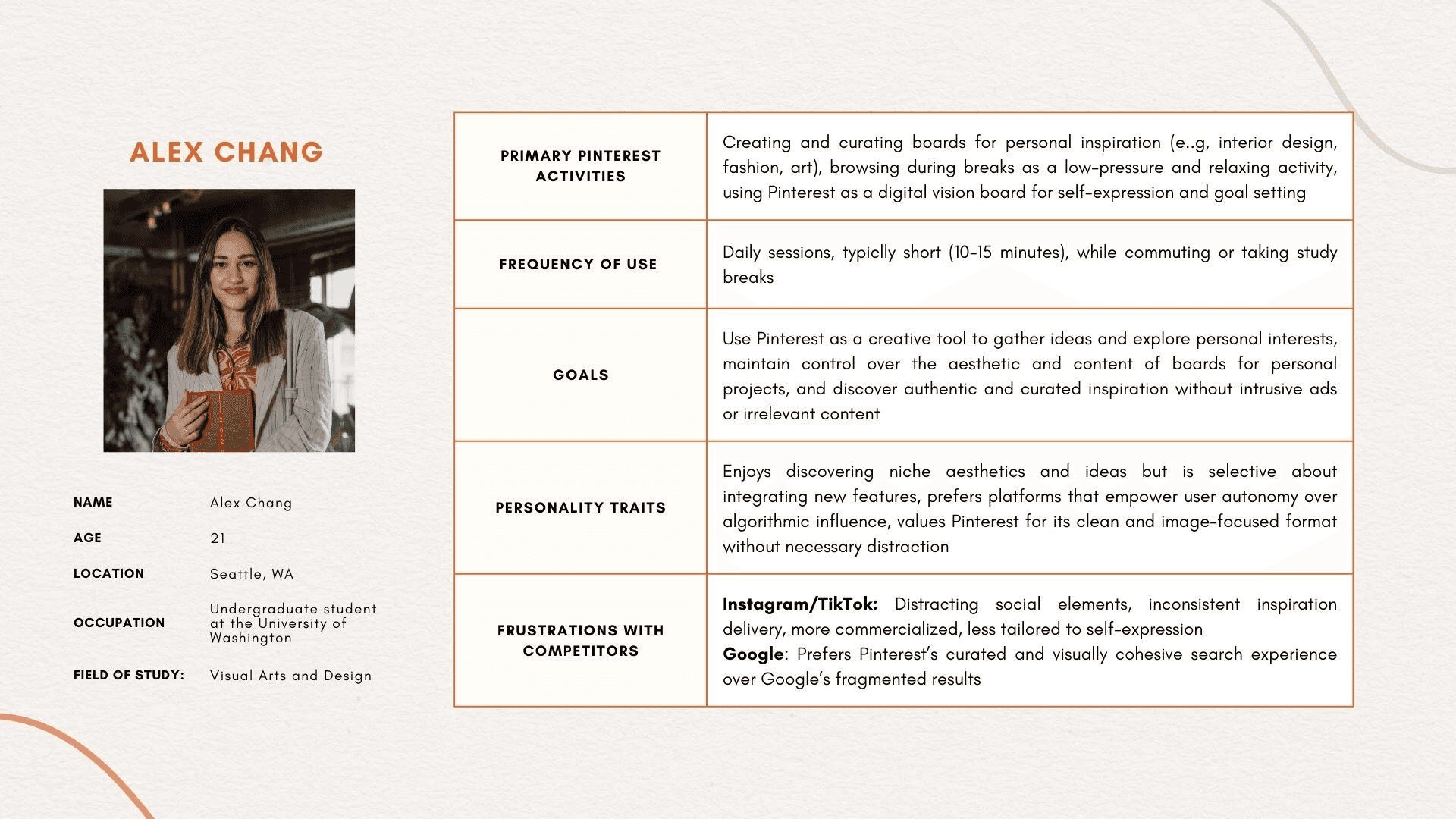
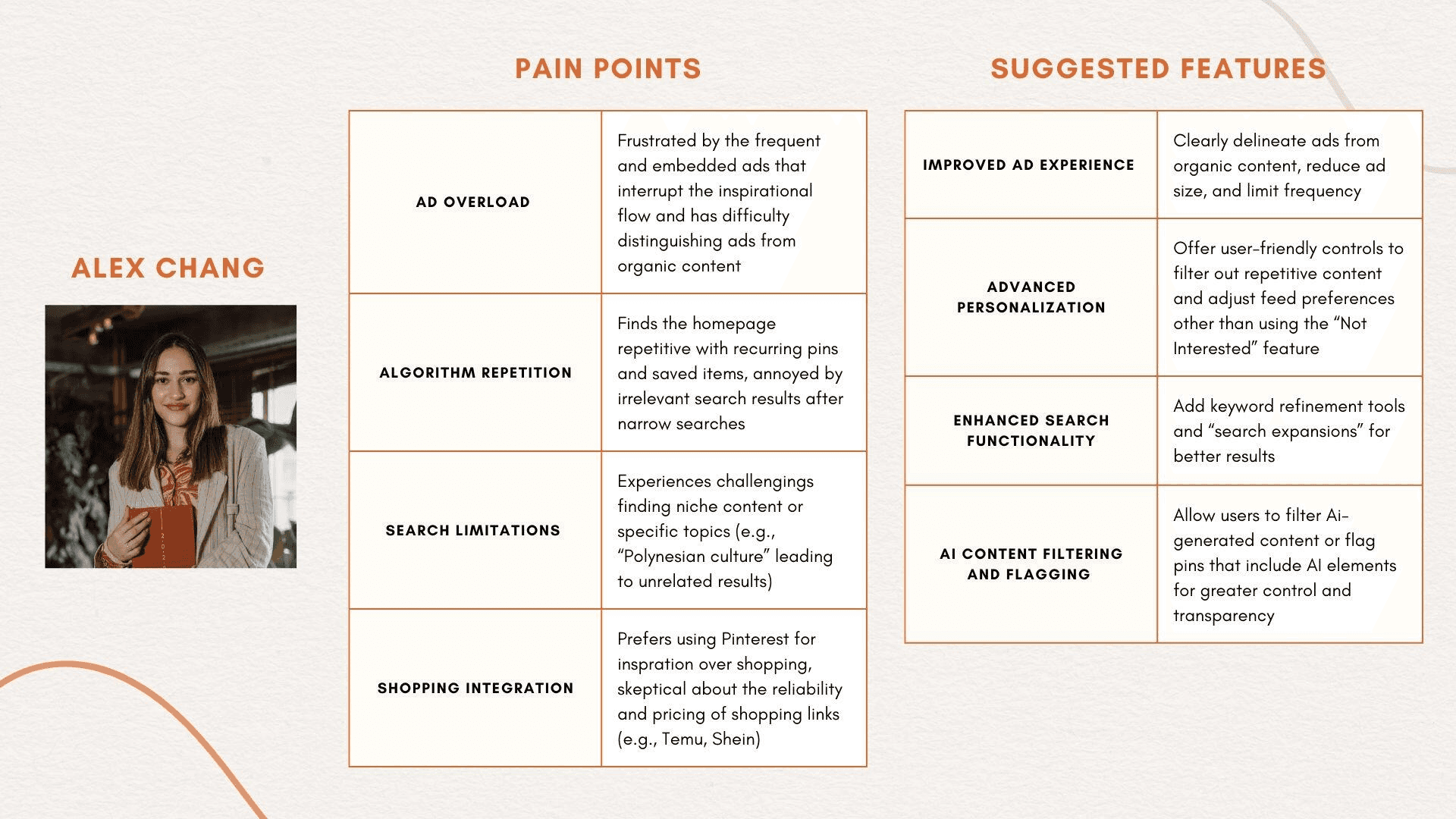
While browsing Reddit comments provides some insight into user frustrations, it lacks the depth of understanding that comes from directly interacting and talking with users. Observing complaints online doesn’t compare to walking through a day in the life of a Pinterest user or hearing firsthand about their motivations and pain points, so I decided to interview University of Washington students to dive into their experiences with Pinterest. Through these conversations, I developed the user persona of Alex Chang, a creatively inspired undergraduate.
Interview Process
To conduct these interviews, I contacted potential participants through various channels, including Discord school club servers, class servers, and announcements shared with the School of Business and one of my professors. Most responses came from Discord users, and I coordinated virtual interview sessions with them. To ensure the process was structured, I created an interview guide and brainstormed questions inspired by the book The Mom Test. While I started with a standard set of questions, I adapted them during the interviews to suit each participant, avoiding repetitive inquiries and making the conversations more personalized. Each session was recorded, so the interview felt more natural, and I could focus more on questions than on analysis.
User Persona
Sources
Interview with Imaan [Loom Recording + Comments from Analysis]
Interview with Malia [Loom Recording + Comments from Analysis]
Interview with Mandy [Loom Recording + Comments from Analysis]
Interview with Tiara [Loom Recording + Comments from Analysis]
Primary Pain Points:
While analyzing the interview transcripts and recordings, I have identified several recurring trends regarding Reddit user frustrations with Pinterest. These include issues with excessive ads, repetitive content, and limited search effectiveness. The interviewees expressed concerns about transparency in ads, distrust in shopping features, and a loss of social and creative functionality. Additionally, challenges with feed personalization, board organization, and the platform’s shift toward commercialization further reveal areas where Pinterest’s user experience could improve. Below is a breakdown of these trends.
Issue | Description |
|---|---|
Ad Overload | Frequent, intrusive ads disrupt the user experience and make it harder to distinguish organic content from ads. |
Algorithmic Repetition | Users encounter repeated or overly similar content, diminishing the freshness and variety of inspiration. |
Irrelevant or Narrow Search Results | The search functionality often fails to deliver specific or niche content effectively, and overly broad or particular searches can yield unsatisfactory results. |
Lack of Transparency in Ads | Ads are often seamlessly embedded, leading users to mistake them for organic pins, which feels deceptive. |
Limited Shopping Trust | Users hesitate to shop on Pinterest due to concerns about reliability, pricing inconsistencies, and a lack of trust in vendors. |
Erosion of Social and Creative Features | Some users lament the loss of social features, such as the ability to search for other users' boards, which made the platform feel more community-oriented. |
Inflexible Board Organization | Limitations in board customization, such as difficulties reorganizing or visually curating boards, frustrate users. |
Overemphasis on Commercialization | Many users feel Pinterest is leaning too heavily into being a shopping platform, diluting its value as a source of inspiration. |
Ineffective Feed Preferences | Adjusting the feed or hiding irrelevant content is often cumbersome or ineffective, leading users to switch to alternative apps like TikTok. |
Disconnection from Personalized Interests | A reliance on trends over individuality leaves users feeling their unique preferences are not fully respected. |
Potential Solutions
Ad Overload
Feature | Functionality | Example |
|---|---|---|
Ad Control Panel | Users will have enhanced control over their ad experience by utilizing ad category toggles to enable or disable specific ad topics, such as fashion or electronics. They can also opt in or out of advertisements from brands that do not align with their interests or values. Users can have a premium subscription option that can remove ads entirely. | If a user disables fashion ads, they will instead see ads from other categories, such as tech or home decor. |
Ad Placement & Type Toggles | Users can customize their ad experience by selecting ad placement options and determining where ads appear on Pinterest. They can allow ads in their feed placement, limit them to the explore placement, or enable board placement, with the option to exclude ads from specific boards. Users can tailor their ad type preferences, choosing between image-only ads for a static, distraction-free browsing experience or video ads that may autoplay or remain muted, with a skip option after 5 seconds. | A user who wants to limit ad placement to only the "Explore" section can toggle off "Feed Placement" and "Board Placement." This will give them a more ad-free browsing experience in their main feed and saved boards. |
Ad Disclosure Badge | To enhance transparency and user trust, Pinterest ads will be differentiated from organic content. Each ad will feature a visible label, such as "Sponsored" or "Promoted," placed consistently in a subtle yet noticeable style. Users can access an interactive explanation by hovering over or clicking the badge, which reveals why the ad appears (e.g., based on recent searches or interests) and offers options to refine preferences, such as excluding specific advertisers. | A user sees an ad for “Eco-Friendly Cleaning Supplies” with a badge that reads: “Sponsored | Based on your recent saves about ‘Green Living.’” |
Feedback-Driven Ad Refinement | Users can refine their ad experience by providing granular feedback on each ad through a dropdown menu. Users can mark ads as “Not Relevant”, “Seen Too Often”, or “Don’t Like This Advertiser”, with the ability to report spam or misleading content for review. This can prevent future ads from a specific brand. This system dynamically adjusts ad targeting, improving user personalization while helping advertisers optimize their campaigns. | A user sees a clothing ad and selects “Not Relevant,” prompting Pinterest to deprioritize fashion-related ads in their feed. |
Improved Algorithm
Feature | Functionality | Example |
|---|---|---|
Improved Learning Algorithm | Users can continuously refine their recommendations based on explicit user feedback. Each pin will feature visible feedback buttons (e.g., thumbs up or thumbs down) to help the algorithm adjust content to users' preferences. A “Tell us what you think” option will allow users to provide more detailed input through a short-answer submission or a quick survey. Disliked pins will decrease the likelihood of similar content, while liked pins will encourage more diverse and relevant recommendations. | When exploring modern interior design, users frequently dislike rustic-style pins. The algorithm reduces rustic recommendations while enhancing modern ones. |
Content Diversity Feature | The “Discover New Ideas” mode (similar to the "More Ideas" feature on boards) temporarily expands content recommendations on the explore page. Users can activate this mode via a toggle to explore less common pins in categories related to their interests. This feature maintains personalization while adding variety, making it ideal for users seeking fresh inspiration beyond their usual recommendations. | A user who primarily engages with fitness workouts activates "Discover New Ideas" and is introduced to healthy meal-prepping Pins. |
Enhanced Search Functionality
Feature | Functionality | Example |
|---|---|---|
Advanced Search Filters | Customizable search filters let users refine results by specific criteria, catering to intents such as inspiration, project execution, or shopping. Users can filter by content type (images, videos, articles, guides), creator type (independent creators, influencers, or brands), and engagement metrics (Most Liked, Most Commented, or Top Saved). They can also refine results by timeframe and opt for ethical/eco-friendly options to prioritize sustainable content. With combined filters, users can stack multiple preferences for precise results, such as filtering for “Top Saved” minimalist furniture posts by independent creators from the past month. | When searching for vegan recipes, users apply filters for "Most Liked" and "Independent Creators" to discover highly rated, non-commercialized recipes. |
Visual Search Breakdown | This transparency feature explains why specific pins appear in search results or the home feed. Users can click a “Why am I seeing this?” button on each pin to view a pop-up explaining factors such as past searches, saved pins, or followed boards. | A user searching for “Cottagecore Aesthetic” sees a pin labeled “Suggested based on your interest in ‘Cottagecore Aesthetic.’” |
Expansion on Social Features
Feature | Functionality | Example |
|---|---|---|
Expanded Collaborative Boards | Multiple users can contribute to shared boards, making them ideal for event planning, group projects, or community inspiration. Users can be assigned different permissions, including view-only, contributor (can add pins), editor (can add, edit, and organize pins), and admin (can manage permissions and remove users). Each pin will support threaded comments and emoji reactions, enabling interactive discussions. An activity feed & notifications tab will track board updates, such as new pins or comments, with customizable notification settings for user preferences. | A family planning a remodel can share inspiration, comment on tile choices, and vote on paint colors. |
Board Discovery | Users can find trending and curated boards beyond their own, enhancing content exploration and community engagement. The Discover Boards button in the main navigation features trending boards, editor’s picks, and user favorites. Curated collections highlight top-performing boards by engagement, while board recommendations personalize suggestions based on user activity. Popularity metrics rank boards by saves and discussions, and creator spotlights showcase influential users. A seasonal boards section will rotate collections based on timely trends, such as holiday decor or fashion seasons. | Users looking for trip ideas can explore curated boards like “Backpacking in Europe” or “Budget-Friendly U.S. Road Trips.” |
Improved Board Organization
Feature | Functionality |
|---|---|
Subcategories and Bulk Select | Users can create folders within boards and subboards for a more structured experience. Folders will allow users to create nested groups within board sections, such as organizing a "DIY Crafts" into Christmas, Halloween, and Easter folders. This system minimizes clutter and provides a more intuitive way to manage content. Reordering entire boards lets users rearrange boards on their profile for better accessibility, while multi-selecting for bulk reordering lets them move, delete, and archive multiple pins at once. |
Tagging | Users can create custom tags for pins to make them easier to find, such as labeling gardening pins with "low-maintenance" or "indoor plants." A smart search bar within boards will then allow filtering by tags, making it easier to find relevant content. Auto-suggested tags can also help users save time by recommending relevant labels based on the content. Lastly, board-level sorting lets users organize pins by date added, popularity, or a custom order using assigned tags. |
Multiple Layouts | Customizable board layout allows users to save and switch between different organizational styles. A column-based layout displays pins in vertical categories for task management. In contrast, a storyboard layout arranges them in a left-to-right sequence for step-by-step tutorials or progress tracking. A magazine layout will mix large featured images with smaller supporting pins, and a mind map layout will visually connect related pins for brainstorming or research. The carousel layout will present pins in a swipeable row for quick browsing. These options provide greater flexibility for organizing and displaying content. |
AI Content
Feature | Functionality | Example |
|---|---|---|
AI Content Moderation and Transparency | Users can differentiate between AI-generated, user-created, and professionally sourced pins for trust and transparency.
User feedback integration will enable users to rate AI-generated content based on quality and relevance, with low-rated pins being deprioritized in search and feed results. | A user browsing for handmade jewelry pins sees a pin labeled as "AI-generated design" and decides to filter out AI content to focus on real handcrafted pieces. |
Advanced AI Content Filters | Users can control how much AI-generated content appears in their search results and feeds. The "No AI Content" toggle lets users exclude AI-generated pins entirely, while user preference sliders let them adjust the balance between AI- and human-created content. Content type filters enable users to prioritize specific visuals, such as original photography, digital art | A graphic designer looking for inspiration enables the "Human-created Only" filter to see original art instead of AI-generated concepts. |
Feature Prioritization
Rice, Kano Model, Value vs. Effort Matrix
Instead of choosing one primary framework, I used a combination of three to assess Pinterest's business challenges and user pain points. A single prioritization framework would not fully address both aspects, so a hybrid approach would be the best solution.
RICE Framework (Business-impact-driven Decisions)
RICE will help me prioritize the most significant features that will have the biggest business impacts without sacrificing user experience. Since Pinterest's primary revenue model relies on advertising, Pinterest must balance monetization with user satisfaction to prevent churn.
MoSCoW Method (Clear Priority Categorization)
The MoSCow method will help me categorize features by importance, enabling me to identify essential features (must-haves) and deprioritize less critical initiatives. This will help prevent scope creep and align development with user needs and business goals.
Value vs. Effort Matrix (Quick Wins)
The Value vs. Effort matrix will help me identify quick wins that Pinterest can implement with minimal effort while also highlighting larger projects that would require strategic resource allocation. With this matrix, I quickly categorize the high-impact features first.
RICE Table Scores
Feature | Reach | Impact | Confidence | Effort | Score |
|---|---|---|---|---|---|
Advanced AI Content Filters | 500M Users | 3 | 95% --> Almost everyone and their mothers on Pinterest want to see genuine, authentic work | 16 person-months —> AI detection, user preference system, filtering integration | 76.49 |
Ad Control Panel | 500M Users —> Ads impact every user | 3 —> Directly addresses the top user complaint about ad overload | 85% —> Strong user complaint according to Reddit (bias) | 20 person-months —> Requires a new user interface, backend control options, and A/B testing to optimize monetization impact | 63.75 |
Ad Placement & Type Toggles | 500M Users --> Personalizing ads applies to ALL users seeing ads (assuming we don't have a premium version yet) | 3 --> I am assuming that users will LOVE the personalization in receiving ads if they have to have ads to begin with | 90% | 27 person-months--> Modifies core ad serving infrastructure; needs extensive testing of different ad placements to optimize both UX and revenue | 50.00 |
Board Discovery | 400M Users --> WE WANT TO KNOW WHY THIS FEATURE IS DOWNPLAYED | 2 --> Users want to know WHERE THIS FEATURE WENT! But it doesn't drastically impact core user flows | 95%--> OMG, so many people (interviewed and indirectly) wondered why the board discovery feature had become more of a low-key feature! | 16 person-months —> Needs a new recommendation for boards (not just pins), trending algorithm, and discoverable UI | 47.50 |
Improved Learning Algorithm | 500M Users | 3 —> Search Relevance improvements directly impact overall satisfaction | 80% | 45 person-months —> Improving core recommendation algorithms requires extensive research, experimentation, model training, and testing | 26.67 |
Feedback-driven Ad Refinement | 500M Users | 2 | 75% —> Similar to the previous reason, but my reasoning is mainly deduced | 30 person-months —> Needs machine learning integration to modify ad preferences based on feedback, new UI controls, and backend adjustments | 25.00 |
Ad Disclosure Badge | 500M Users | 1 —> There is mixed feedback about how some users want to distinguish ads, but I think it'd be a good option to be able to toggle this | 50% | 10 person-months —> Minor UI addition, metadata updates, low complexity, leverages existing ad infrastructure | 25.00 |
AI Content Moderation | 500M Users | 1 --> Users will see content authenticity without fundamental changes to interaction | 95%--> The Reddit comments I attached earlier answer this... | 18 person-months —> Requires AI detection models, content labeling system, and user reporting functionality | 23.75 |
Expanded Collaborative Boards | 400M Users | 1 —> I think users would appreciate the collaborative features, but I don't think it'd make or break their experience | 85%--> I think users would enjoy more a collaborative expansion on the boards, but it's just something they'd appreciate | 18 person-months —> Robust permission system, real-time collaboration features, and notification infrastructure, relies on multi-user coordination | 18.89 |
Visual Search Breakdown | 400M Users —> Affects most users, especially when users have been upset with their recent recommendations | 1 --> There won't really be a point to this feature if users can't find a way to alter what they're seeing | 65% --> I think this will be a great way for users to find out the reasoning behind their recommendations, but again, there's no point if they can't change it | 20 person-months —> ML for explaining recommendations and UI changes to present explanations clearly | 13.00 |
Content Diversity Feature | 300M Users —> A smaller group actively seeks content variety | 2 —> Several users enoy the "More Ideas" feature on boards, but not every user will care | 60% —> I'd need more information on this | 14 person-months —> Builds on existing recommendation engine but adds diversity mode | 12.86 |
Subcategories and Drag & Drop Tools | 300M Users | 1 --> We have some neat, organizational freaks that have discussed this on Reddit (including me), but it's not a make-or-break feature | 90% --> Tons of Reddit comments about better organizational structure for saving Pins | 22 person-months —> Data structure changes to support nested folders and extensive testing for usability | 12.27 |
Tagging | 200M Users | 1 --> Tagging improves searchability without altering core functionality | 60% --> This is something I'd need more information on for sure, but other socials utilize tagging, so why not have it for Pinterest when saving and creating? | 10 person-months —> Tag storage, search integration, simple UI | 3.00 |
Multiple Layouts | 100M | 1 | 50% | 28 | 1.79 |
Advanced Search Filters | 50M | 0.5 | 50% | 12 | 1.04 |
MoSCoW Framework
Must-Have | Should-Have | Could-Have | Will-Not-Have |
|---|---|---|---|
Advanced AI Content Filters | Board Discovery | Expanded Collaborative Boards | Tagging |
AI Content Moderation/Transparency | Subcategories & Drag/Drop Tools | Content Diversity Feature | Feedback-Driven Ad Refinement |
Improved Learning Algorithm | Ad Disclosure Badge | Ad Control Panel | Multiple Layouts |
Advanced Search Filters | Ad Placement & Type Tools | ||
Visual Search Breakdown | |||
Impact vs. Effort Matrix
Note:
The specific impact metric I am using is "the extent to which customer engagement or satisfaction would be impacted," and I will determine effort with this criterion: High effort > 18 person-months, Low effort < 18 person-months
Features | Impact | Justification | Effort |
|---|---|---|---|
Advanced AI Content Filters | High | AI content filtering addresses growing concerns about content authenticity | Low |
Ad Control Panel | High | Ads are a big complaint, and this feature directly addresses that, but it's tied to monetization | High |
Ad Placement & Type Toggles | High | Personalization for user engagement with ads | High |
Board Discovery | High | Users can be inspired by other users' collections, which could motivate them to stay on the app | Low |
Improved Learning Algorithm | High | Search relevance is a core pain point for Pinterest users | High |
Feedback-driven Ad Refinement | High | User feedback can significantly improve ad targeting accuracy | High |
Ad Disclosure badge | High | Transparency fosters trust, especially regarding sponsored content | Low |
AI Content Moderation | High | Content transparency is important regarding misinformation concerns | Low |
Expanded Collaborative Boards | High | Collaboration tools increase engagement between users | Low |
Visual Search Breakdown | Low | Transparency for pins is helpful, but not critical for most users | High |
Content Diversity Feature | Low | Only a niche group cares about the wide variety of additional content in their feeds | Low |
Subcategories and Drag & Drop Tools | Low | Advanced board organization (unfortunately) appeals to a small, niche audience | High |
Tagging | Low | Tagging doesn't significantly enhance the core Pinterest experience | Low |
Multiple Layouts | Low | Layout customization appeals only to specific user segments | High |
Advanced Search Filters | Low | This feature has limited broad appeal | Low |
Final Rankings
Rank | Feature | Rice Score | Rice Points (Normalized) | MoSCoW | MoSCoW Points | Impact/Effort | I/E Points | Weighted Total | Final Score |
|---|---|---|---|---|---|---|---|---|---|
1 | Advanced AI Content Filters | 76.49 | 100 | Must-Have | 100 | Quick Win (H/L) | 100 | (100×0.5)+(100×0.3)+(100×0.2 | 100.00 |
2 | Board Discovery | 47.50 | 62 | Should-Have | 75 | Quick Win (H/L) | 100 | (62×0.5)+(75×0.3)+(100×0.2) | 73.50 |
3 | Ad Control Panel | 63.75 | 83 | Could-Have | 50 | Big Bet (H/H) | 75 | (83×0.5)+(50×0.3)+(75×0.2) | 71.50 |
4 | AI Content Moderation | 23.75 | 31 | Must-Have | 100 | Quick Win (H/L) | 100 | (31×0.5)+(100×0.3)+(100×0.2) | 65.50 |
5 | Improved Learning Algorithm | 26.67 | 35 | Must-Have | 100 | Big Bet (H/H) | 75 | (35×0.5)+(100×0.3)+(75×0.2) | 62.50 |
6 | Ad Placement & Type Toggles | 50.00 | 65 | Could-Have | 50 | Big Bet (H/H) | 75 | (65×0.5)+(50×0.3)+(75×0.2) | 62.50 |
7 | Ad Disclosure Badge | 25.00 | 33 | Should-Have | 75 | Quick Win (H/L) | 100 | (33×0.5)+(75×0.3)+(100×0.2) | 59.00 |
8 | Expanded Collaborative Boards | 18.89 | 25 | Could-Have | 50 | Quick Win (H/L) | 100 | (25×0.5)+(50×0.3)+(100×0.2) | 47.50 |
9 | Feedback-Driven Ad Refinement | 25.00 | 33 | Will-Not-Have | 25 | Big Bet (H/H) | 75 | (33×0.5)+(25×0.3)+(75×0.2) | 39.00 |
10 | Visual Search Breakdown | 13.00 | 17 | Could-Have | 50 | Time Sink (L/H) | 25 | (17×0.5)+(50×0.3)+(25×0.2) | 36.00 |
11 | Subcategories & Drag/Drop | 12.27 | 16 | Should-Have | 75 | Time Sink (L/H) | 25 | (16×0.5)+(75×0.3)+(25×0.2) | 35.50 |
12 | Advanced Search Filters | 1.04 | 1 | Should-Have | 75 | Maybe (L/L) | 50 | (1×0.5)+(75×0.3)+(50×0.2) | 33.00 |
13 | Content Diversity Feature | 12.86 | 17 | Could-Have | 50 | Maybe (L/L) | 50 | (17×0.5)+(50×0.3)+(50×0.2) | 28.50 |
14 | Tagging | 3.00 | 4 | Will-Not-Have | 25 | Maybe (L/L) | 50 | (4×0.5)+(25×0.3)+(50×0.2) | 19.50 |
15 | Multiple Layouts | 1.79 | 2 | Will-Not-Have | 25 | Time Sink (L/H) | 25 | (2×0.5)+(25×0.3)+(25×0.2) | 13.50 |
User Needs vs. Business Strategy
Discrepancies between User Priorities and the Prioritization Framework
During my analysis, I recognized a SIGNIFICANT difference between the features that best align with user (primarily interviewee) pain points and those that ranked highest in the prioritization framework. While solutions such as the Ad Control Panel and Improved Learning Algorithm directly address users' most immediate frustrations, the prioritization framework instead ranked Advanced AI Content Filters and Board Discovery as the top solutions.
This discrepancy highlights a super important challenge in product decision-making: how do you balance what users vocalize as their most urgent needs with broader business goals, feasibility, and long-term impact?
Why is there such a big difference?
Several factors contribute to this gap between user priorities and the prioritization rankings:
Business Impact vs. User Experience Priorities
From a user perspective, the biggest frustrations, such as ad overload, search relevancy issues, and algorithmic repetition, are immediate usability problems that degrade their experience daily. These issues affect engagement and retention, which are important for short-term user satisfaction.
HOWEVER, from a business perspective, Pinterest’s revenue is driven by ad engagement and automation features. Solutions like AI content filtering align with Pinterest’s long-term strategic growth by reinforcing content authenticity, improving user trust, and maintaining engagement without drastically altering revenue models.
The Ad Control Panel, for example, is a high-risk intervention. If users significantly reduce ad exposure, it could negatively impact Pinterest’s primary revenue stream. This makes it a complex problem that requires internal testing and validation, which I do not have the capacity to analyze with the data I currently have.
Feature Scope & Technical Complexity
Features such as Visual Search Breakdown and algorithmic improvements require substantial backend development to refine machine learning models, optimize search indexing, and improve content recommendations. These resource-intensive features require extensive testing, making them harder to justify within this study's constraints.
In contrast, Advanced AI Content Filters are a more contained, implementable solution. They provide a new customization layer without requiring deep changes to Pinterest’s core algorithms.
Long-Term Strategy vs. Short-Term Fixes
User concerns reflect immediate usability problems, but the prioritization framework considers Pinterest’s long-term sustainability.
AI Content Transparency and filtering align with industry trends in ethical AI use and content authenticity, helping Pinterest stay ahead of future challenges while maintaining user trust.
In contrast, ad-related changes introduce financial uncertainty, which again, if not carefully tested and refined, could disrupt Pinterest’s ad-driven business model.
Primary Feature
Product Introduction
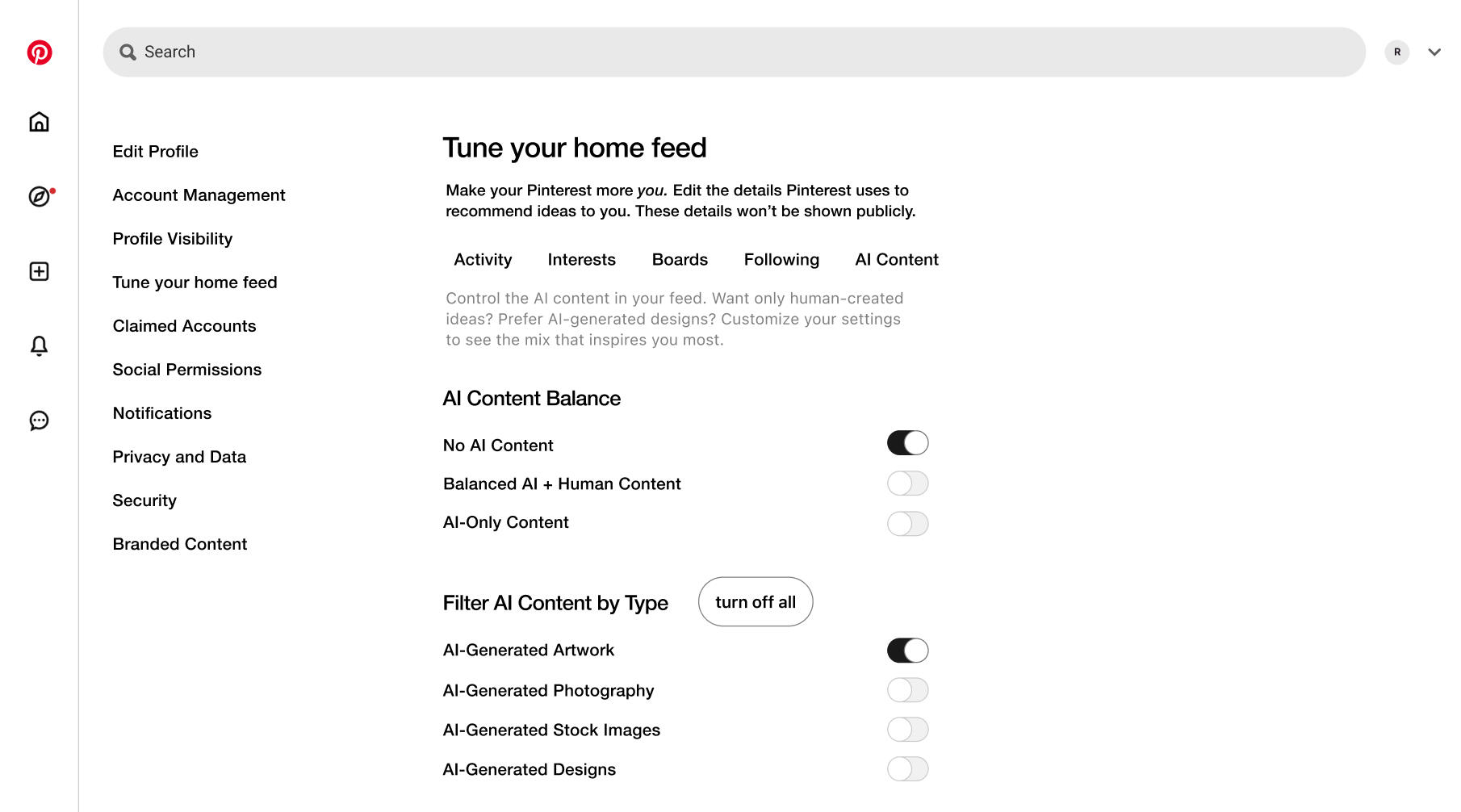
The AI Content Filtering feature enhances user control over AI-generated content in Pinterest’s home feed, enabling a more tailored, transparent browsing experience. In the "Tune Your Home Feed" settings, users can adjust their AI Content Balance to No AI Content, Balanced AI + Human Content, or AI-Only Content. Additionally, users can fine-tune their preferences with granular filters, enabling or disabling specific AI-generated content types, such as artwork, photography, stock images, and designs. This feature ensures that Pinterest remains a platform for authentic inspiration, allowing users to curate their experience based on personal preferences and creative needs.
Why I Chose This Feature Based on Prioritization Frameworks
To determine the most impactful feature that aligns with both user needs and Pinterest’s business goals, I evaluated the possible solutions with the rankings from the prioritization frameworks:
RICE: AI Content Filters scored the highest (76.49) because they can improve content discovery, trust, and engagement with minimal technical complexity.
With the MoSCoW method, I categorized it as a “Must-Have” because of strong user demand for AI transparency and the need for better content control.
Value vs. Effort Matrix: This feature is a high-value, low-effort initiative, making it a quick win that improves user experience without requiring major backend overhauls.
Why This Matters?
Users have expressed frustration with AI-generated content cluttering their feeds. This feature strengthens Pinterest’s reputation as a trusted, user-first discovery platform.
AI transparency is a growing industry concern, and giving users control over AI-generated content will hopefully increase trust and engagement.
This feature enhances content personalization, aligning with Pinterest’s mission to provide relevant, user-driven inspiration.
Why I Chose Advanced AI Content Filters Over Other Top Prioritized Solutions
When evaluating which feature to prototype, I carefully considered the prioritized solutions, primarily based on interviewee concerns. While features like Improved Learning Algorithm, Board Discovery, and Ad Control Panel all address key user frustrations, I ultimately chose Advanced AI Content Filters for the following reasons:
Improved Learning Algorithm: The Algorithm Exists—It Just Needs to Improve (Hence the Name)
The problem with Pinterest’s algorithm is that it does not effectively surface relevant content. Users experience repetitive pins, outdated interests being pushed, and an overall decline in personalized recommendations.
This does not necessarily require a brand-new feature; instead, Pinterest needs to fine-tune and optimize its algorithm.
Users also did not mention (and many might not even be aware of) Pinterest’s “Tune Your Home Feed” feature under profile settings. This feature allows users to hide ideas based on recent activity, input specific interests to refine recommendations, and control ideas from boards, followers, and past searches.
Because this feature already exists, the real issue might be a marketing and awareness problem rather than a lack of functionality. Many users might not even know they can personalize their feed, meaning education and visibility improvements could significantly impact the feature without requiring a major algorithm overhaul.
Board Discovery: A Previously Removed Feature
Board Discovery was a core feature on Pinterest. Users could find and browse boards curated by other users. Pinterest still curates boards today, specifically for brands and featured collections, but users can no longer quickly discover other users’ boards.
Many interviewees (and Reddit discussions) expressed nostalgia for this feature, which suggests some user demand for it.
However, I cannot access internal data to determine why this feature was removed. Pinterest may have deliberately removed board discovery due to engagement, monetization, or moderation issues.
Since this feature was actively discontinued, reintroducing it poses unknown risks. Without insight into Pinterest’s decision-making process, it’s difficult to determine whether this feature would be viable for reimplementation.
Ad Control Panel: A BIG User Demand but a Business Risk
Ad Overload was the #1 source of user frustration, making the Ad Control Panel one of the most impactful features to introduce.
However, Pinterest relies on ad revenue as its primary source of monetization. Allowing users to limit ads too aggressively could significantly affect revenue, which requires internal testing and financial analysis.
I don’t have access to Pinterest’s ad engagement data or the ability to measure the impact of reducing ad placements. Without this, I can’t confidently propose changes to the ad structure without knowing the financial consequences.
Because this solution would require extensive A/B testing and business analysis, it is beyond the scope of this study.
Product Mock-Up
The Advanced AI Content Filters feature includes toggle controls that let users enable or disable AI-generated content at different levels.
AI Content Balance (Toggles)
Users can choose their preferred AI exposure level by toggling between:
No AI Content → Completely removes AI-generated Pins from feed and search.
Balanced AI + Human Content→ Shows a mix of AI-generated and human-created content.
AI-Only Content → Prioritizes AI-generated Pins over human-created content.
How It Works: Only one toggle can be enabled at a time. If a user selects "No AI Content," the other two options will be disabled. I also used toggles instead of a slider (even though it would make more sense) to follow Pinterest's UI design, since they seem to dislike sliders.
AI Content Type Filters (Toggles)
Users can further customize their AI filtering preferences by toggling specific AI content types ON or OFF:
AI-Generated Artwork
AI-Generated Photography
AI-Generated Stock Images
AI-Generated Designs
How It Works: If "No AI Content" is toggled ON, these individual AI content type filters are automatically disabled. Users can also click "Turn Off All" to quickly disable all AI-generated content types.
Expected Impact & Benefits
Increases User Trust: Filtering controls enhance transparency, preventing misleading recommendations.
Enhances Personalization: Users can fine-tune their inspiration feeds, keeping Pinterest aligned with their creative needs.
Reduces Frustration: Users frustrated by excessive AI-generated content can now curate their feeds to their preferences.
Aligns with Pinterest’s Business Goals: Maintains high engagement by making content discovery more relevant while allowing Pinterest to preserve AI-powered features for users who prefer them.
Figma Mock-Up
Feature Validation
Now, to validate this feature, I would need to test several hypotheses about user behavior and content preferences.
Hypotheses:
Users want control over AI-generated content: If users feel overwhelmed by AI-generated Pins, they will use filtering options to refine their feed.
A toggle-based approach improves trust and transparency. Users will appreciate the ability to turn off AI-generated content to avoid misleading or irrelevant results.
AI content filtering increases user engagement: Users who customize their AI content exposure will spend more time browsing because they see more relevant and inspiring content.
Users will benefit from AI categorization by content type: Integrating AI content into categories (e.g., art, stock images, photography) will improve search accuracy and personalized inspiration.
Assumptions:
Users can distinguish between AI-generated and human-created content and care about the difference.
Too much AI content negatively impacts discovery and creativity, especially for hobbyists, designers, and artists.
AI filtering will not significantly affect user engagement among those who do not actively adjust settings.
Users prefer flexibility in content curation rather than an all-or-nothing approach.
How can I validate this Feature?
At the time of writing, I've been working on this case study for about 3 months, and I'm ready to move on. BUT if I were to continue this case study (e.g., part 2), I would devise a plan to validate the feature, as you would in a real PM job. To validate the effectiveness of my proposed solution, I would conduct follow-up user interviews with the same participants from my previous research and a new group. These interviews will focus on how users interpret the feature's UI and theoretical functionality rather than direct interaction with a working prototype. Examples of follow-up questions:
Last time we spoke, you mentioned frustrations with AI content in your feed. Does this UI help address those issues? What specifically do you think would work well? Is there anything about it that doesn’t entirely solve the problem?
You previously talked about how to adjust your feed preferences. If this AI filtering feature were available, how would you expect to use it? How often do you think you’d adjust these settings? Would you expect these settings to apply only to your feed or search results?
You mentioned that sometimes you see AI-generated content you don’t trust or don’t want to see. Looking at these settings, do you feel like you’d have enough control over that? If not, what’s missing? Have you seen other platforms handle this better?
When you first look at this UI, what do you immediately understand about how it works? Is there anything confusing or unclear? What would make this feature more intuitive for you?
Last time, you mentioned that you actively seek certain types of content. How do you think this feature would impact your ability to find those? How would this feature affect your ability to find those? Would you expect this to improve your experience? Are there any issues with these filters that might prevent you from seeing what you want?
What would it be if you could change one thing about this AI filtering UI? Why is that important to you? Have you seen similar features elsewhere that worked better?
Metrics to Measure:
To evaluate the effectiveness of AI Content Preferences, I would track the following metrics post-launch. I also described my success criteria, but, obviously, it depends on the company's internal goals, which I again don't have access to.
Metric | Success Criteria |
|---|---|
Feature Adoption Rate: Percentage of users who engage with the AI Content Preferences settings within the first 30 days. | Success Criteria: Success if at least 25-30% of active users engage with the AI Content Preferences settings within the first 30 days after launch. |
Toggle & Slider Engagement: Number of times users adjust the AI content exposure slider or toggle AI content on/off. | Success Criteria: Success if users make an average of 1–2 adjustments per session and the overall number of adjustments shows a consistent upward trend over the first month, indicating that users find the feature useful and are actively fine-tuning their feed. |
Time Spent on Feed: Changes in user engagement (e.g., increased session duration) after users adjust their AI content settings. | Success Criteria: Success if there is a statistically significant increase (e.g., 10-15%) in session duration for users who engage with the AI filters compared to a control group or historical baseline, demonstrating enhanced engagement. |
Content Save Rate: Any increase or decrease in pins saved by users who enable AI filters versus those who do not. | Success Criteria: Success if users who enable AI filters save 5-10% more pins on average than those who do not, suggesting that the content becomes more relevant and inspirational. |
Trust & Transparency Perception: This is qualitative feedback on whether users feel Pinterest is more transparent about AI content after enabling filters. | Success Criteria: Success if qualitative feedback (from surveys or focus groups) indicates that at least 70% of users feel that Pinterest has become more transparent about AI-generated content and trust the content curation process more. |
Conclusion & Takeaways
Over the past three months, from January to late March 2025, I poured my energy into this case study, and it turned out to be a challenging yet rewarding journey.
One of the primary lessons was understanding Pinterest’s core goal: figuring out what the company aims to achieve for its users and how it stands out in a crowded market. This insight was essential in framing the entire study. I also had my first deep dive into prioritization frameworks, exploring methods such as RICE and MoSCoW. In the past, I’d relied on more straightforward prioritization tools, so this was a refreshing change, even if building a compelling argument for why I chose a particular feature over others was one of the toughest parts of the process.
Another challenge was the lack of internal data and a team to brainstorm with. I relied heavily on secondary research and interviews to gather the necessary insights, which made success metrics largely subjective. Despite these hurdles, I’m really proud of how it turned out! I overcame my usual aversion to Figma, which led me to learn a lot about web design while creating clear, engaging data visuals.
Ultimately, this case study is close to my heart because I enjoy using Pinterest, and it’s my dream to work there! Although some solutions I envision (such as different layout options) might not be widely desired, they reflect my personal passion for the platform.